netip.Addr features an Unmap()
method returning the unwrapped IPv4 contained in an IPv4-mapped IPv6
address: from ::ffff:203.0.113.10 or ::ffff:cb00:710a, it returns
203.0.113.10. There is no Map() or To6() method for the reverse
direction. Such a method is trivial to implement, but Go maintainers have
rejected it on the grounds that users should write
netip.AddrFrom16(ip.As16()) and let the compiler optimize it. Today,
this pattern is eight times slower than a native method. How can we teach the
compiler to optimize this sequence?
The alternatives
Let’s explore three ways to implement the map semantics for netip.Addr. My
favorite is to add it to the Go standard library. Go maintainers prefer a small
external helper chaining netip.AddrFrom16() and netip.Addr.As16(), hoping
the compiler eventually optimizes it. The unsafe package
opens a third path, with the same performance as the first solution.
Modifying the Go standard library
Internally, netip.Addr stores any IP address as a
128-bit value with an extra field z to encode the family and the zone:
type Addr struct {
    addr uint128
    z unique.Handle[addrDetail]
}

type addrDetail struct {
    isV6   bool   // IPv4 is false, IPv6 is true.
    zoneV6 string // != "" only if IsV6 is true.
}

var (
    z0    unique.Handle[addrDetail]
    z4    = unique.Make(addrDetail{})
    z6noz = unique.Make(addrDetail{isV6: true})
)
AddrFrom4() encodes an IPv4 address as an
IPv4-mapped IPv6 address and sets z to the unique value z4:
// AddrFrom4 returns the address of the IPv4 address given by the bytes in addr.
func AddrFrom4(addr [4]byte) Addr {
    return Addr{
        addr: uint128{
            0,
            0xffff00000000 |
                uint64(addr[0])<<24 | uint64(addr[1])<<16 |
                uint64(addr[2])<<8 | uint64(addr[3])},
        z: z4,
    }
}
Unmap() turns an IPv4-mapped IPv6 address into an
IPv4 address by setting the z field to z4:
func (ip Addr) Unmap() Addr {
    if ip.Is4In6() {
        ip.z = z4
    }
    return ip
}
Implementing the reverse direction inside the Go standard library is trivial: we
set the z field to z6noz if the address is IPv4.
// To6 maps an IPv4 address to an IPv4-mapped IPv6 address. It returns an
// IPv6 address unmodified.
func (ip Addr) To6() Addr {
    if ip.Is4() {
        ip.z = z6noz
    }
    return ip
}
Update (2026-10)
Instead of patching Go, we can use the -overlay flag of go
build to hijack any package, including the standard library. In our case,
it can add To6() to net/netip. Yet it is
cumbersome: the flag expects a JSON file mapping absolute
paths in GOROOT to replacement files, and you need to add it to every go
command.
As a helper
We can’t access the z field from outside the net/netip package. Instead, we
build a small helper around the netip.AddrFrom16(ip.As16()) pattern:
// AddrTo6 maps an IPv4 address to an IPv4-mapped IPv6 address. It returns an
// IPv6 address unmodified.
func AddrTo6(ip netip.Addr) netip.Addr {
    if ip.Is4() {
        ip = netip.AddrFrom16(ip.As16())
    }
    return ip
}
As an unsafe function
Another solution uses the unsafe package to alter the Addr struct through
a proxy with the same memory layout:
// addrProxy has the same memory layout as netip.Addr.
type addrProxy struct {
    addr [2]uint64      // netip.uint128
    z    unsafe.Pointer // unique.Handle[netip.addrDetail]
}

var (
    anyIPv6    = netip.IPv6Unspecified()
    netipZ6noz = (*addrProxy)(unsafe.Pointer(&anyIPv6)).z
)

// AddrTo6 maps an IPv4 address to an IPv4-mapped IPv6 address. It returns an
// IPv6 address unmodified.
func AddrTo6(ip netip.Addr) netip.Addr {
    if !ip.Is4() {
        return ip
    }
    (*addrProxy)(unsafe.Pointer(&ip)).z = netipZ6noz
    return ip
}
Benchmarks
On my computer, with Go 1.27.1, the standard library solution costs 0.88 ns per
operation, while the solution favored by Go maintainers costs 7.14 ns. The
unsafe solution matches the performance of the first one.
goos: linux
goarch: amd64
pkg: github.com/vincentbernat/go-netip-addrto6
cpu: AMD Ryzen 5 5600X 6-Core Processor
                   │     sec/op     │
AddrTo6/safe            7.137n ± 0%
AddrTo6/unsafe         0.8682n ± 2%
AddrTo6/builtin        0.8775n ± 2%
Assembly code
Let’s check the assembly code the compiler generates for each solution.
The one built into the standard library looks like this:
// AX = input.addr.hi, BX = input.addr.lo, CX = input.z
 CMPQ  net/netip·z4(SB), CX     ; check "z" if this is an IPv4 address
 JNE   end                      ; if not, stop here
 MOVQ  net/netip·z6noz(SB), CX  ; CX = netip.z6noz
end:
 RET
// return value = Addr{hi: AX, lo: BX, z: CX}
Go’s assembly language is not a direct representation of the underlying
machine language: it operates on a semi-abstract instruction set derived from
Plan 9’s assembler. It has four pseudo-registers: FP (frame pointer
for function arguments), PC (program counter), SB (static base pointer for
global symbols), and SP (stack pointer). It also has architecture-specific
registers like AX, CX, DX, BX, SI, DI, and R8 to R15.
Instructions storing data use their last argument as the destination.
Instructions can carry an explicit size suffix: MOVB moves a byte, MOVW 16
bits, MOVL 32 bits, and MOVQ 64 bits. In the example above, the first
instruction compares the 64-bit value z4 with the CX register.
The unsafe solution looks almost the same:
// AX = input.addr.hi, BX = input.addr.lo, CX = input.z
 CMPQ  net/netip·z4(SB), CX  ; check "z" if this is an IPv4 address
 JNE   end                   ; if not, stop here
 MOVQ  netipZ6noz(SB), CX    ; CX = netip.z6noz
end:
 RET
// return value = Addr{hi: AX, lo: BX, z: CX}
The helper solution has far more instructions. To understand why, let’s look at
the code for As16() and
AddrFrom16(). They are short enough for the compiler
to inline them.
func (ip Addr) As16() (a16 [16]byte) {
    byteorder.BEPutUint64(a16[:8], ip.addr.hi)
    byteorder.BEPutUint64(a16[8:], ip.addr.lo)
    return a16
}

func AddrFrom16(addr [16]byte) Addr {
    return Addr{
        addr: uint128{
            byteorder.BEUint64(addr[:8]),
            byteorder.BEUint64(addr[8:]),
        },
        z: z6noz,
    }
}
We can already guess the pattern to optimize: the code packs the IP address into
an array, copies it, then unpacks it. If we inline the Go code by hand, we get:
func AddrTo6(input netip.Addr) netip.Addr {
    if !input.Is4() {
        return input
    }

    var a16 [16]byte
    byteorder.BEPutUint64(a16[:8], input.addr.hi)
    byteorder.BEPutUint64(a16[8:], input.addr.lo)

    addr := a16

    var output netip.Addr
    output.addr.hi = byteorder.BEUint64(addr[:8])
    output.addr.lo = byteorder.BEUint64(addr[8:])
    output.z = netip.z6noz
    return output
}
As humans, we can mentally derive the optimized form:
func AddrTo6(input netip.Addr) netip.Addr {
    if !input.Is4() {
        return input
    }
    var output netip.Addr
    output.addr.hi = input.addr.hi
    output.addr.lo = input.addr.lo
    output.z = netip.z6noz
    return output
}
Unfortunately, as of Go 1.26.8, the compiler is not smart enough to do the same:
// AX = input.addr.hi, BX = input.addr.lo, CX = input.z
; Push the stack (32 bytes):
;    0(SP) addr netip.uint128
;   16(SP) a16 [16]byte
 PUSHQ   BP
 MOVQ    SP, BP
 SUBQ    $32, SP

 CMPQ    net/netip·z4(SB), CX  ; check "z" if this is an IPv4 address
 JNE     end                   ; if not, stop here

; Pack: byteorder.BEPutUint64(a16[:8], input.addr.hi)
;       byteorder.BEPutUint64(a16[8:], input.addr.lo)
 MOVBEQ  AX, net/netip·a16+16(SP)
 MOVBEQ  BX, net/netip·a16+24(SP)

; addr = a16, 16 bytes at once through the vector register X0
 MOVUPS  net/netip·a16+16(SP), X0
 MOVUPS  X0, net/netip·addr(SP)

; CX = netip.z6noz
 MOVQ    net/netip·z6noz(SB), CX
; Unpack: output.addr.hi = byteorder.BEUint64(addr[:8])
;         output.addr.lo = byteorder.BEUint64(addr[8:])
 MOVBEQ  net/netip·addr(SP), AX
 MOVBEQ  net/netip·addr+8(SP), BX

end:
 ADDQ    $32, SP
 POPQ    BP
 RET
// return value = Addr{hi: AX, lo: BX, z: CX}
The compiler does a decent job on the byte shuffling: the eight byte stores of
BEPutUint64() become a single MOVBEQ, which stores a register byte-swapped.
The eight byte loads of BEUint64() become a single MOVBEQ the other way
round. Three groups of instructions remain: a pack, a copy, and an
unpack.
Hacking the Go compiler
The Go compiler has several phases:
- Parsing
- The compiler tokenizes and parses the source code. It builds a syntax tree
for each source file.
- Type checking
- The compiler maps each identifier to the object it denotes, folds
constants, and infers the type of every expression.
- IR construction
- The compiler converts the syntax tree and its types into its own intermediate
representation (IR). This process, called “noding,” goes through
a serialization format named unified IR.
- Middle end
- The compiler performs several optimization passes on the IR,
such as devirtualization, function call inlining,
and escape analysis.
- Walk
- This phase runs two steps: order of evaluation decomposes complex
statements into simpler ones, and desugaring transforms higher-level Go
constructs, like
switch or channels, into more primitive instructions or
calls to the runtime.
- Generic SSA
- The compiler converts the IR into Static Single Assignment (SSA)
form, a lower-level intermediate representation suited for
machine-independent optimizations and rewrite rules.
- Machine code generation
- The compiler rewrites the SSA form into machine-specific variants,
allocates registers, and applies more optimization passes. At the end, the
assembler turns the generated instructions into machine code.
The hammer
My first idea is to replace occurrences of netip.AddrFrom16(ip.As16()) with
netip.Addr{addr: ip.addr, z: netip.z6noz} as early as possible, during the
“noding” process. Before that, the type checking phase prevents
us from accessing unexported struct fields.
Go 1.27 introduced a convenient debug option to dump the IR of a function at
interesting points during compilation:
$ GOTOOLCHAIN=go1.27.1 GOAMD64=v3 go build -a -gcflags="-d=astdump=AddrTo6Safe" .
Writing text ast output for AddrTo6Safe to AddrTo6Safe.ast
Writing html ast output for AddrTo6Safe to AddrTo6Safe.html
Writing html syntax output for AddrTo6Safe to AddrTo6Safe.syntax.html
In the HTML file, the first column shows the IR as it comes out of noding:
DCLFUNC addrto6.AddrTo6Safe ABI:ABIInternal FUNC-func(netip.Addr) netip.Addr
DCLFUNC-Dcl
. NAME-addrto6.ip Class:PPARAM Offset:0 OnStack Used netip.Addr
. NAME-addrto6.~r0 Class:PPARAMOUT Offset:0 OnStack netip.Addr
DCLFUNC-body
. IF # ipv6_safe.go:11:2
. IF-Cond
. . CALLFUNC bool
. . CALLFUNC-Fun
. . . METHEXPR addrto6.Is4 FUNC-func(netip.Addr) bool
. . . . TYPE netip.Addr Class:PEXTERN Offset:0 type netip.Addr
. . CALLFUNC-Args
. . . NAME-addrto6.ip Class:PPARAM Offset:0 OnStack Used netip.Addr
. IF-Body
. . AS # ipv6_safe.go:12:6
. . . NAME-addrto6.ip Class:PPARAM Offset:0 OnStack Used netip.Addr
. . . CALLFUNC netip.Addr
. . . CALLFUNC-Fun
. . . . NAME-netip.AddrFrom16 Class:PFUNC Offset:0 Used FUNC-func([16]byte) netip.Addr
. . . CALLFUNC-Args
. . . . CALLFUNC ARRAY-[16]byte
. . . . CALLFUNC-Fun
. . . . . METHEXPR addrto6.As16 FUNC-func(netip.Addr) [16]byte
. . . . . . TYPE netip.Addr Class:PEXTERN Offset:0 type netip.Addr
. . . . CALLFUNC-Args
. . . . . NAME-addrto6.ip Class:PPARAM Offset:0 OnStack Used netip.Addr
. RETURN # ipv6_safe.go:14:2
. RETURN-Results
. . NAME-addrto6.ip Class:PPARAM Offset:0 OnStack Used netip.Addr
In the body of the if statement, we spot the calls to the method
netip.Addr.As16() and to the function netip.AddrFrom16(). Our goal is to
patch them with a struct literal:
IF-Body
. AS # ipv6_safe.go:12:6
. . NAME-addrto6.ip Class:PPARAM Offset:0 OnStack Used netip.Addr
. . STRUCTLIT netip.Addr
. . STRUCTLIT-List
. . . STRUCTKEY netip.addr
. . . . DOT netip.addr netip.uint128
. . . . . NAME-addrto6.ip Class:PPARAM Offset:0 OnStack Used netip.Addr
. . . STRUCTKEY netip.z
. . . . NAME-netip.z6noz Class:PEXTERN Offset:0 unique.Handle[net/netip.addrDetail]
In noder’s reader.go, the expr() method builds the IR tree for
an expression. At the end of the exprCall case, we add a call to a
rewriteAddrFrom16As16() function. It takes the current node and returns the
struct literal on success, or nil if the rewrite is not possible. First, we
check that we have the expected pattern: a call to the netip.AddrFrom16()
function with a call to the netip.Addr.As16() method as its only argument:
func rewriteAddrFrom16As16(n ir.Node) ir.Node {
    call, ok := n.(*ir.CallExpr)
    if !ok || call.Op() != ir.OCALLFUNC ||
        len(call.Args) != 1 || len(call.Init()) != 0 ||
        !isNetipFunc(call.Fun, "AddrFrom16") {
        return nil
    }
    inner, ok := call.Args[0].(*ir.CallExpr)
    if !ok || inner.Op() != ir.OCALLFUNC ||
        len(inner.Args) != 1 || len(inner.Init()) != 0 ||
        !isNetipFunc(inner.Fun, "Addr.As16") {
        return nil
    }
    x := inner.Args[0]
    // [...]
}
Then, we fetch netip.z6noz:
z6noz, err := lookupVar(ir.StaticCalleeName(call.Fun).Sym().Pkg, "z6noz")
if err != nil {
    return nil
}
And we build the struct literal:
typ := call.Type()
pos := call.Pos()
var list []ir.Node
for i, f := range typ.Fields() {
    var value ir.Node
    switch f.Sym.Name {
    case "addr":
        value = typecheck.DotField(pos, x, i)
    case "z":
        value = z6noz
    default:
        return nil
    }
    list = append(list, ir.NewStructKeyExpr(pos, f, value))
}
lit := ir.NewCompLitExpr(pos, ir.OSTRUCTLIT, typ, list)
lit.SetTypecheck(1)
return lit
Have a look at the complete patch. We can test it
with the following commands:
$ cd src
$ ./make.bash
Building Go cmd/dist using /usr/lib/go-1.27. (go1.27.1 linux/amd64)
Building Go toolchain1 and bootstrap cmd/go (go_bootstrap) using /usr/lib/go-1.27.
Building Go toolchain2 using go_bootstrap and Go toolchain1.
Building Go toolchain3 and commands using go_bootstrap and Go toolchain2.
Checking command staleness for linux/amd64.
---
Installed Go for linux/amd64 in /home/bernat/code/free/go
Installed commands in /home/bernat/code/free/go/bin
*** You need to add /home/bernat/code/free/go/bin to your PATH.
$ export PATH=$PWD/../bin:$PATH
$ go version
go version go1.28-devel_9834516e20 Sat Sep 12 08:23:11 2026 -0700 linux/amd64
$ go test net/netip/...
ok      net/netip   0.224s
$ cd ../../go-netip-addrto6
$ go test .
ok      github.com/vincentbernat/go-netip-addrto6   0.062s
The generated code for the helper is now the shortest possible version!
// AX = input.addr.hi, BX = input.addr.lo, CX = input.z
 CMPQ    net/netip·z4(SB), CX     ; check "z" if this is an IPv4 address
 JNE     end                      ; if not, stop here
 MOVQ    net/netip·z6noz(SB), CX  ; CX = netip.z6noz
end:
 RET
// return value = Addr{hi: AX, lo: BX, z: CX}
Go maintainers are unlikely to accept this change. It relies on the internal
structure of net/netip.Addr. It’s an ugly hack in the noder, whose job is to
faithfully translate the type-checked AST into the IR. And it’s harder to
maintain than adding a To6() method.
The screwdriver
The right place for such an optimization is the generic SSA phase. One of
the last machine-independent passes is memcombine. With the appropriate debug
flag, the compiler dumps the SSA form after this pass:
$ GOTOOLCHAIN=go1.26.8 GOAMD64=v3 \
> go build -a -gcflags='-d=ssa/memcombine/dump=AddrTo6Safe' .
$ head -5 AddrTo6Safe_01__memcombine.dump
AddrTo6Safe func(netip.Addr) netip.Addr
  b2:
    (?) v1 = InitMem <mem>
    (?) v2 = SP <uintptr>
    (?) v3 = SB <uintptr>
The result of the memcombine pass follows the same structure as the assembly
code for AddrTo6Safe() we looked at earlier: two stores,
one move, and two loads we would like to optimize away.
; […]
  v502 = ArgIntReg <uint64> {ip+0} [0]              ; input.addr.hi
  v490 = ArgIntReg <uint64> {ip+8} [1]              ; input.addr.lo
  v466 = ArgIntReg <*netip.addrDetail> {ip+16} [2]  ; input.z
; […]
  v22 = LocalAddr <*[16]byte> {netip.a16} v2 v1     ; &a16
  v173 = OffPtr <*byte> [8] v22                     ; &a16[8]
  v442 = Bswap64 <uint64> v490                      ; bswap(input.addr.lo)
  v542 = Bswap64 <uint64> v502                      ; bswap(input.addr.hi)
  v161 = Store <mem> {uint64} v22 v542 v23          ; a16[:8] = bswap(hi)
  v282 = Store <mem> {uint64} v173 v442 v161        ; a16[8:] = bswap(lo)

  v285 = LocalAddr <*[16]byte> {netip.addr} v2 v282 ; &addr
  v286 = Move <mem> {[16]byte} [16] v285 v22 v282   ; addr = a16

  v415 = OffPtr <*byte> [8] v285                    ; &addr[8]
  v416 = Load <uint64> v285 v286                    ; addr[:8]
  v299 = Bswap64 <uint64> v416                      ; output.addr.hi
  v174 = Load <uint64> v415 v286                    ; addr[8:]
  v39  = Bswap64 <uint64> v174                      ; output.addr.lo
; […]
Each line features a value identifier (v442), an operation with its type
(Bswap64 <uint64>), and its arguments (v490). Values are the basic
building blocks of SSA and are defined exactly once. Square brackets enclose
integer parameters ([8]) and curly braces contain auxiliary arguments
({netip.addr}). Operations writing to memory produce a new memory state. Every
memory operation takes the current state as its last argument, which keeps them
in order.
On paper
Let’s focus on output.addr.lo, aka v39:
  v490 = ArgIntReg <uint64> {ip+8} [1]              ; input.addr.lo
  v22 = LocalAddr <*[16]byte> {netip.a16} v2 v1     ; &a16
  v173 = OffPtr <*byte> [8] v22                     ; &a16[8]
  v442 = Bswap64 <uint64> v490                      ; bswap(input.addr.lo)
  v282 = Store <mem> {uint64} v173 v442 v161        ; a16[8:] = bswap(lo)
  v285 = LocalAddr <*[16]byte> {netip.addr} v2 v282 ; &addr
  v286 = Move <mem> {[16]byte} [16] v285 v22 v282   ; addr = a16
  v415 = OffPtr <*byte> [8] v285                    ; &addr[8]
  v174 = Load <uint64> v415 v286                    ; addr[8:]
  v39  = Bswap64 <uint64> v174                      ; output.addr.lo
To simplify this code, we could apply three rewriting rules:
-
The first one adds a shortcut when loading through a move: (Load (OffPtr
[o] p) (Move p src mem)) => (Load (OffPtr [o] src) mem). This matches v174
with its arguments v415 and v286 and creates a new value v600:
  v490 = ArgIntReg <uint64> {ip+8} [1]              ; input.addr.lo
  v22 = LocalAddr <*[16]byte> {netip.a16} v2 v1     ; &a16
  v173 = OffPtr <*byte> [8] v22                     ; &a16[8]
  v442 = Bswap64 <uint64> v490                      ; bswap(input.addr.lo)
  v282 = Store <mem> {uint64} v173 v442 v161        ; a16[8:] = bswap(lo)
  v285 = LocalAddr <*[16]byte> {netip.addr} v2 v282 ; &addr
  v286 = Move <mem> {[16]byte} [16] v285 v22 v282   ; addr = a16
  v415 = OffPtr <*byte> [8] v285                    ; &addr[8]
  v600 = OffPtr <*byte> [8] v22                     ; &a16[8]
  v174 = Load <uint64> v600 v282                    ; a16[8:]
  v39  = Bswap64 <uint64> v174                      ; output.addr.lo
-
The second one simplifies a load following a store: (Load p (Store p x
_)) => x. The load is forwarded: the stored value replaces it and no memory
access remains. It matches v174. It notices that v600 and v173 are the
same address and replaces v174 with a copy of v442:
  v490 = ArgIntReg <uint64> {ip+8} [1]              ; input.addr.lo
  v22 = LocalAddr <*[16]byte> {netip.a16} v2 v1     ; &a16
  v173 = OffPtr <*byte> [8] v22                     ; &a16[8]
  v442 = Bswap64 <uint64> v490                      ; bswap(input.addr.lo)
  v282 = Store <mem> {uint64} v173 v442 v161        ; a16[8:] = bswap(lo)
  v285 = LocalAddr <*[16]byte> {netip.addr} v2 v282 ; &addr
  v286 = Move <mem> {[16]byte} [16] v285 v22 v282   ; addr = a16
  v415 = OffPtr <*byte> [8] v285                    ; &addr[8]
  v600 = OffPtr <*byte> [8] v22                     ; &a16[8]
  v174 = Copy <uint64> v442                         ; bswap(input.addr.lo)
  v39  = Bswap64 <uint64> v174                      ; output.addr.lo
-
The last step cancels the two byte swaps: (Bswap64 (Bswap64 x)) => x.
v39 becomes a copy of v490:
  v490 = ArgIntReg <uint64> {ip+8} [1]              ; input.addr.lo
  v22 = LocalAddr <*[16]byte> {netip.a16} v2 v1     ; &a16
  v173 = OffPtr <*byte> [8] v22                     ; &a16[8]
  v442 = Bswap64 <uint64> v490                      ; bswap(input.addr.lo)
  v282 = Store <mem> {uint64} v173 v442 v161        ; a16[8:] = bswap(lo)
  v285 = LocalAddr <*[16]byte> {netip.addr} v2 v282 ; &addr
  v286 = Move <mem> {[16]byte} [16] v285 v22 v282   ; addr = a16
  v415 = OffPtr <*byte> [8] v285                    ; &addr[8]
  v600 = OffPtr <*byte> [8] v22                     ; &a16[8]
  v174 = Copy <uint64> v442                         ; bswap(input.addr.lo)
  v39  = Copy <uint64> v490                         ; output.addr.lo = input.addr.lo
If we ignore the values not needed to compute v39, only this SSA form remains:
  v490 = ArgIntReg <uint64> {ip+8} [1]  ; input.addr.lo
  v39  = Copy <uint64> v490             ; output.addr.lo = input.addr.lo
Let’s switch to output.addr.hi, aka v299:
  v502 = ArgIntReg <uint64> {ip+0} [0]              ; input.addr.hi
  v22 = LocalAddr <*[16]byte> {netip.a16} v2 v1     ; &a16
  v173 = OffPtr <*byte> [8] v22                     ; &a16[8]
  v542 = Bswap64 <uint64> v502                      ; bswap(input.addr.hi)
  v161 = Store <mem> {uint64} v22 v542 v23          ; a16[:8] = bswap(hi)
  v282 = Store <mem> {uint64} v173 v442 v161        ; a16[8:] = bswap(lo)
  v285 = LocalAddr <*[16]byte> {netip.addr} v2 v282 ; &addr
  v286 = Move <mem> {[16]byte} [16] v285 v22 v282   ; addr = a16
  v416 = Load <uint64> v285 v286                    ; addr[:8]
  v299 = Bswap64 <uint64> v416                      ; output.addr.hi
To optimize it away, we also apply three rewriting rules:
-
The first one also adds a shortcut when loading through a move, but
without an offset: (Load p (Move p src mem)) => (Load src mem). This rewrites v416
to use arguments from v286:
  v502 = ArgIntReg <uint64> {ip+0} [0]              ; input.addr.hi
  v22 = LocalAddr <*[16]byte> {netip.a16} v2 v1     ; &a16
  v173 = OffPtr <*byte> [8] v22                     ; &a16[8]
  v542 = Bswap64 <uint64> v502                      ; bswap(input.addr.hi)
  v161 = Store <mem> {uint64} v22 v542 v23          ; a16[:8] = bswap(hi)
  v282 = Store <mem> {uint64} v173 v442 v161        ; a16[8:] = bswap(lo)
  v285 = LocalAddr <*[16]byte> {netip.addr} v2 v282 ; &addr
  v286 = Move <mem> {[16]byte} [16] v285 v22 v282   ; addr = a16
  v416 = Load <uint64> v22 v282                     ; a16[:8]
  v299 = Bswap64 <uint64> v416                      ; output.addr.hi
-
The second rule forwards a value stored one step earlier, skipping over a
store to another address: (Load p (Store q _ (Store p x _))) => x. This
matches v416: x is v542, p is v22 (&a16), q is v173
(&a16[8]), and p and q do not overlap for uint64.
  v502 = ArgIntReg <uint64> {ip+0} [0]              ; input.addr.hi
  v22 = LocalAddr <*[16]byte> {netip.a16} v2 v1     ; &a16
  v173 = OffPtr <*byte> [8] v22                     ; &a16[8]
  v542 = Bswap64 <uint64> v502                      ; bswap(input.addr.hi)
  v161 = Store <mem> {uint64} v22 v542 v23          ; a16[:8] = bswap(hi)
  v282 = Store <mem> {uint64} v173 v442 v161        ; a16[8:] = bswap(lo)
  v285 = LocalAddr <*[16]byte> {netip.addr} v2 v282 ; &addr
  v286 = Move <mem> {[16]byte} [16] v285 v22 v282   ; addr = a16
  v416 = Copy <uint64> v542                         ; bswap(input.addr.hi)
  v299 = Bswap64 <uint64> v416                      ; output.addr.hi
-
The third rule cancels two byte swaps: (Bswap64 (Bswap64 x)) => x.
v299 becomes a copy of v502:
  v502 = ArgIntReg <uint64> {ip+0} [0]              ; input.addr.hi
  v22 = LocalAddr <*[16]byte> {netip.a16} v2 v1     ; &a16
  v173 = OffPtr <*byte> [8] v22                     ; &a16[8]
  v542 = Bswap64 <uint64> v502                      ; bswap(input.addr.hi)
  v161 = Store <mem> {uint64} v22 v542 v23          ; a16[:8] = bswap(hi)
  v282 = Store <mem> {uint64} v173 v442 v161        ; a16[8:] = bswap(lo)
  v285 = LocalAddr <*[16]byte> {netip.addr} v2 v282 ; &addr
  v286 = Move <mem> {[16]byte} [16] v285 v22 v282   ; addr = a16
  v416 = Copy <uint64> v542                         ; bswap(input.addr.hi)
  v299 = Copy <uint64> v502                         ; output.addr.hi = input.addr.hi
If we remove the values not used to compute v299, we get this SSA form:
  v502 = ArgIntReg <uint64> {ip+0} [0] ; input.addr.hi
  v299 = Copy <uint64> v502            ; output.addr.hi = input.addr.hi
In practice
Most of these rules already exist in generic.rules. They use
conditions to validate their context: ssa.IsSamePtr() for the same address,
ssa.Disjoint() for addresses that do not overlap. The rule forwarding a stored
value to a load already exists with three variants looking through several other
stores. Here are the two we need:
(Load <t1> p1 (Store {t2} p2 x _))
    && ssa.IsSamePtr(p1, p2)
    && copyCompatibleType(t1, x.Type)
    && t1.Size() == t2.Size()
    => x
(Load <t1> p1 (Store {t2} p2 _ (Store {t3} p3 x _)))
    && ssa.IsSamePtr(p1, p3)
    && copyCompatibleType(t1, x.Type)
    && t1.Size() == t3.Size()
    && ssa.Disjoint(p3, t3, p2, t2)
    => x
Go 1.27 added the rule loading through a move with CL 748200 to fix
issue #77720:
(Load <t1> op1:(OffPtr [o1] p1) move:(Move [n] p2 src mem))
    && o1 >= 0 && o1+t1.Size() <= n && ssa.IsSamePtr(p1, p2)
    && !ssa.IsVolatile(src)
    => @move.Block (Load <t1> (OffPtr <op1.Type> [o1] src) mem)
It lacks a variant without an offset:
(Load <t1> p1 move:(Move [n] p2 src mem))
    && p1.Op != ssaop.OpOffPtr
    && t1.Size() <= n && ssa.IsSamePtr(p1, p2)
    && !ssa.IsVolatile(src)
    => @move.Block (Load <t1> (OffPtr <p1.Type> [0] src) mem)
There is no generic rule to cancel two byte swaps, but the AMD64 lowering
pass includes this rule:
(BSWAP(Q|L) (BSWAP(Q|L) p)) => p
After switching to Go’s development branch and adding the missing
rule, the generated assembly code is worse than with Go 1.26.8,
even though our additional rule slightly improves the situation at the end:
// AX = input.addr.hi, BX = input.addr.lo, CX = input.z
; Push the stack (16 bytes):
;    0(SP) a16 [16]byte
 PUSHQ   BP
 MOVQ    SP, BP
 SUBQ    $16, SP

 CMPQ    net/netip·z4(SB), CX       ; check "z" if this is an IPv4 address
 JNE     end                        ; if not, stop here

; The four forwarded bytes: the low half of input.addr.lo is taken apart and
; put back together in registers
 MOVQ    BX, DX                     ; DX = input.addr.lo
 SHRQ    $24, BX                    ; BX = input.addr.lo >> 24
 MOVQ    DX, SI                     ; SI = input.addr.lo
 SHRQ    $16, DX                    ; DX = input.addr.lo >> 16
 MOVQ    SI, DI                     ; DI = input.addr.lo, kept for the pack
 SHRQ    $8, SI                     ; SI = input.addr.lo >> 8
 MOVBLZX DIB, R8                    ; R8 = byte(input.addr.lo)
 MOVBLZX SIB, SI                    ; SI = byte(input.addr.lo >> 8)
 SHLQ    $8, SI
 ORQ     R8, SI                     ; SI = two low bytes of input.addr.lo
 MOVBLZX DL, DX                     ; DX = byte(input.addr.lo >> 16)
 SHLQ    $16, DX
 ORQ     SI, DX
 MOVBLZX BL, BX                     ; BX = byte(input.addr.lo >> 24)
 SHLQ    $24, BX
 ORQ     DX, BX                     ; BX = input.addr.lo & 0xffffffff

; Pack: byteorder.BEPutUint64(a16[:8], input.addr.hi)
;       byteorder.BEPutUint64(a16[8:], input.addr.lo)
 MOVBEQ  AX, net/netip·a16(SP)
 MOVBEQ  DI, net/netip·a16+8(SP)

; The four other bytes of input.addr.lo, read one by one from a16
 MOVBLZX net/netip·a16+11(SP), DX   ; a16[11]
 SHLQ    $32, DX
 ORQ     DX, BX
 MOVBLZX net/netip·a16+10(SP), DX   ; a16[10]
 SHLQ    $40, DX
 ORQ     DX, BX
 MOVBLZX net/netip·a16+9(SP), DX    ; a16[9]
 SHLQ    $48, DX
 ORQ     DX, BX
 MOVBLZX net/netip·a16+8(SP), DX    ; a16[8]
 SHLQ    $56, DX

; output.z = netip.z6noz
 MOVQ    net/netip·z6noz(SB), CX
; output.addr.hi = byteorder.BEUint64(a16[:8])
 MOVBEQ  net/netip·a16(SP), AX
; output.addr.lo assembled from the previous steps
 ORQ     DX, BX

end:
 LEAVEQ
 RET
// return value = Addr{hi: AX, lo: BX, z: CX}
The rule loading through a move, added in Go 1.27, introduced this regression.
Out of order
Let’s not give up now! In reality, the rewriting rules run before memcombine,
notably in the late opt pass. At this point, the inlined versions of
BEPutUint64() and BEUint64() still expand to sixteen byte stores and sixteen
byte loads, matching their source code:
func BEUint64(b []byte) uint64 {
    _ = b[7] // bounds check hint to compiler; see golang.org/issue/14808
    return uint64(b[7]) | uint64(b[6])<<8 | uint64(b[5])<<16 | uint64(b[4])<<24 |
        uint64(b[3])<<32 | uint64(b[2])<<40 | uint64(b[1])<<48 | uint64(b[0])<<56
}
Let’s follow two bytes of output.addr.lo: addr[15] and addr[11]. Here is
a simplified SSA form before late opt:
  v273 = Trunc64to8 <byte> v490                     ; byte(input.addr.lo)
  v226 = Trunc64to8 <byte> v225                     ; byte(input.addr.lo >> 32)
; […]
  v235 = Store <mem> {byte} v233 v226 v223          ; a16[11] = byte(lo >> 32)
  v247 = Store <mem> {byte} v245 v238 v235          ; a16[12] = …
  v259 = Store <mem> {byte} v257 v250 v247          ; a16[13] = …
  v271 = Store <mem> {byte} v269 v262 v259          ; a16[14] = …
  v282 = Store <mem> {byte} v280 v273 v271          ; a16[15] = byte(lo)
  v285 = LocalAddr <*[16]byte> {netip.addr} v2 v282 ; &addr
  v286 = Move <mem> {[16]byte} [16] v285 v22 v282   ; addr = a16
; […]
  v433 = OffPtr <*byte> [15] v285                   ; &addr[15]
  v435 = Load <byte> v433 v286                      ; addr[15]
  v479 = OffPtr <*byte> [11] v285                   ; &addr[11]
  v481 = Load <byte> v479 v286                      ; addr[11]
The first rule loads through the move: (Load (OffPtr [o] p) (Move p src mem))
=> (Load (OffPtr [o] src) mem). It matches both loads, which now read a16
with the memory state before the copy:
  v600 = OffPtr <*byte> [15] v22 ; &a16[15]
  v435 = Load <byte> v600 v282   ; a16[15]
  v601 = OffPtr <*byte> [11] v22 ; &a16[11]
  v481 = Load <byte> v601 v282   ; a16[11]
The second rule shortcuts a load following a store: (Load p (Store p x _)) =>
x. It matches v435, as v282 stores a16[15]. It does not match v481:
v235 stores a16[11] four stores earlier in the chain, while the variants of
this rule look through three stores at most.
  v435 = Copy <byte> v273        ; byte(input.addr.lo)
  v601 = OffPtr <*byte> [11] v22 ; &a16[11]
  v481 = Load <byte> v601 v282   ; a16[11]
The same happens to the other bytes: the rule forwards the four bytes stored
last, a16[12] to a16[15]. The twelve other loads now read a16 instead of
addr.
BEUint64() becomes a chain of Or64, each one adding a byte shifted into
place. memcombine is a pass written in Go, not a set of rewrite
rules. It starts from the last Or64 of the chain and collects up to eight
terms. If each term is a byte load, extended to 64 bits and shifted, and if the
eight loads read consecutive addresses from the same pointer with the same
memory state, it replaces the whole chain with a single 64-bit load and a byte
swap. Otherwise, it tries again with four, then two terms, and from each
intermediate Or64. Here is the loop checking each term in a simplified version
of combineLoads():
for i := int64(0); i < n; i++ {
    v := a[i]
    shift := int64(0)
    if v.Op == shiftOp {
        v, shift = peelShift(v)
    }
    if v.Op != extOp {
        return false
    }
    load := v.Args[0]
    if load.Op != ssaop.OpLoad {
        return false
    }
    if load.Args[1] != mem {
        return false
    }
    p, off := splitPtr(load.Args[0])
    if p != base {
        return false
    }
    r[i] = LoadRecord{load: load, offset: off, shift: shift}
}
For output.addr.hi, the eight loads read a16 with the same memory state
v282:
  v13  = Load <byte> v22 v282               ; a16[0]
  v530 = Load <byte> v14 v282               ; a16[1]
  v488 = Load <byte> v504 v282              ; a16[2]
  v405 = Load <byte> v537 v282              ; a16[3]
  v385 = Load <byte> v397 v282              ; a16[4]
  v361 = Load <byte> v373 v282              ; a16[5]
  v196 = Load <byte> v63 v282               ; a16[6]
  v432 = Load <byte> v315 v282              ; a16[7]
  v319 = ZeroExt8to64 <uint64> v432         ; uint64(a16[7])
  v329 = ZeroExt8to64 <uint64> v196         ; uint64(a16[6])
  v330 = Lsh64x64 <uint64> [true] v329 v138 ; uint64(a16[6]) << 8
  v331 = Or64 <uint64> v319 v330            ; a16[7] | a16[6] << 8
; […] same for a16[5] to a16[1]
  v401 = ZeroExt8to64 <uint64> v13          ; uint64(a16[0])
  v402 = Lsh64x64 <uint64> [true] v401 v55  ; uint64(a16[0]) << 56
  v403 = Or64 <uint64> v402 v391            ; | a16[0] << 56 = output.addr.hi
memcombine merges them into one load and a swap:
  v286 = Load <uint64> v22 v282   ; a16[:8]
  v285 = Bswap64 <uint64> v286    ; output.addr.hi
For output.addr.lo, here is the chain memcombine sees after late opt:
  v436 = ZeroExt8to64 <uint64> v273 ; addr[15], forwarded
  v448 = Or64 <uint64> v436 v447    ; | addr[14] << 8, forwarded
  v460 = Or64 <uint64> v459 v448    ; | addr[13] << 16, forwarded
  v472 = Or64 <uint64> v471 v460    ; | addr[12] << 24, forwarded
  v484 = Or64 <uint64> v483 v472    ; | a16[11] << 32, loaded
  v496 = Or64 <uint64> v495 v484    ; | a16[10] << 40, loaded
  v508 = Or64 <uint64> v507 v496    ; | a16[9] << 48, loaded
  v520 = Or64 <uint64> v519 v508    ; | a16[8] << 56, loaded
From v520, four of the eight terms are forwarded bytes, not loads from memory,
and memcombine can’t combine them. It doesn’t merge the four remaining loads
either, as they sit on top of the forwarded bytes.
Back in order
In summary, the rewriting rules run too early to be effective. A quick
workaround exists: run an earlier round of memcombine before late opt. After
this change, the generated code for the helper is back to the
shortest possible version:
// AX = input.addr.hi, BX = input.addr.lo, CX = input.z
 CMPQ    net/netip·z4(SB), CX     ; check "z" if this is an IPv4 address
 JNE     end                      ; if not, stop here
 MOVQ    net/netip·z6noz(SB), CX  ; CX = netip.z6noz
end:
 RET
// return value = Addr{hi: AX, lo: BX, z: CX}
And the benchmark confirms it! ✌️
goos: linux
goarch: amd64
pkg: github.com/vincentbernat/go-netip-addrto6
cpu: AMD Ryzen 5 5600X 6-Core Processor
                   │   Go 1.26.8    │             Our branch              │
                   │     sec/op     │    sec/op     vs base               │
AddrTo6/safe          6.5470n ±  0%   0.8944n ± 4%  -86.34% (p=0.002 n=6)
AddrTo6/unsafe        0.9071n ±  3%   0.8682n ± 1%   -4.28% (p=0.002 n=6)
AddrTo6/builtin       0.8871n ±  2%   0.8785n ± 1%        ~ (p=0.310 n=6)
Next steps
I think Go maintainers would reject this change because of the additional
memcombine pass. Instead, I plan to publish this blog post and bring up the
subject again as a follow-up to issue #54365. Either the sheer complexity and
the Go 1.27 regression convince the maintainers that adding a To6() method is
simpler and more efficient, or they advise me on how to move forward. Either
way, digging into this subject taught me a lot about the Go compiler! ⚙️
Update (2026-10)
I opened issue #81994 to propose Addr.To6(). Give it a 👍 if you want
it in Go!






















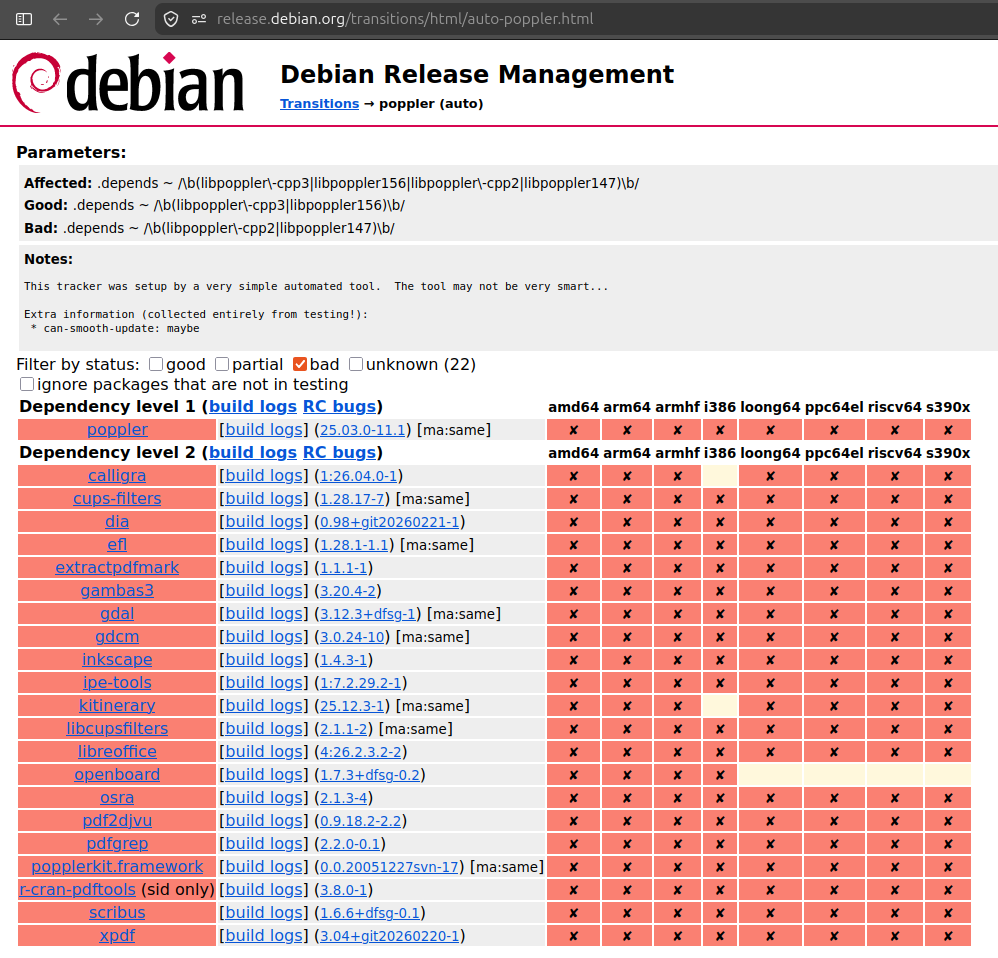 The Poppler transition tracker identifies the old and new runtime library package names.
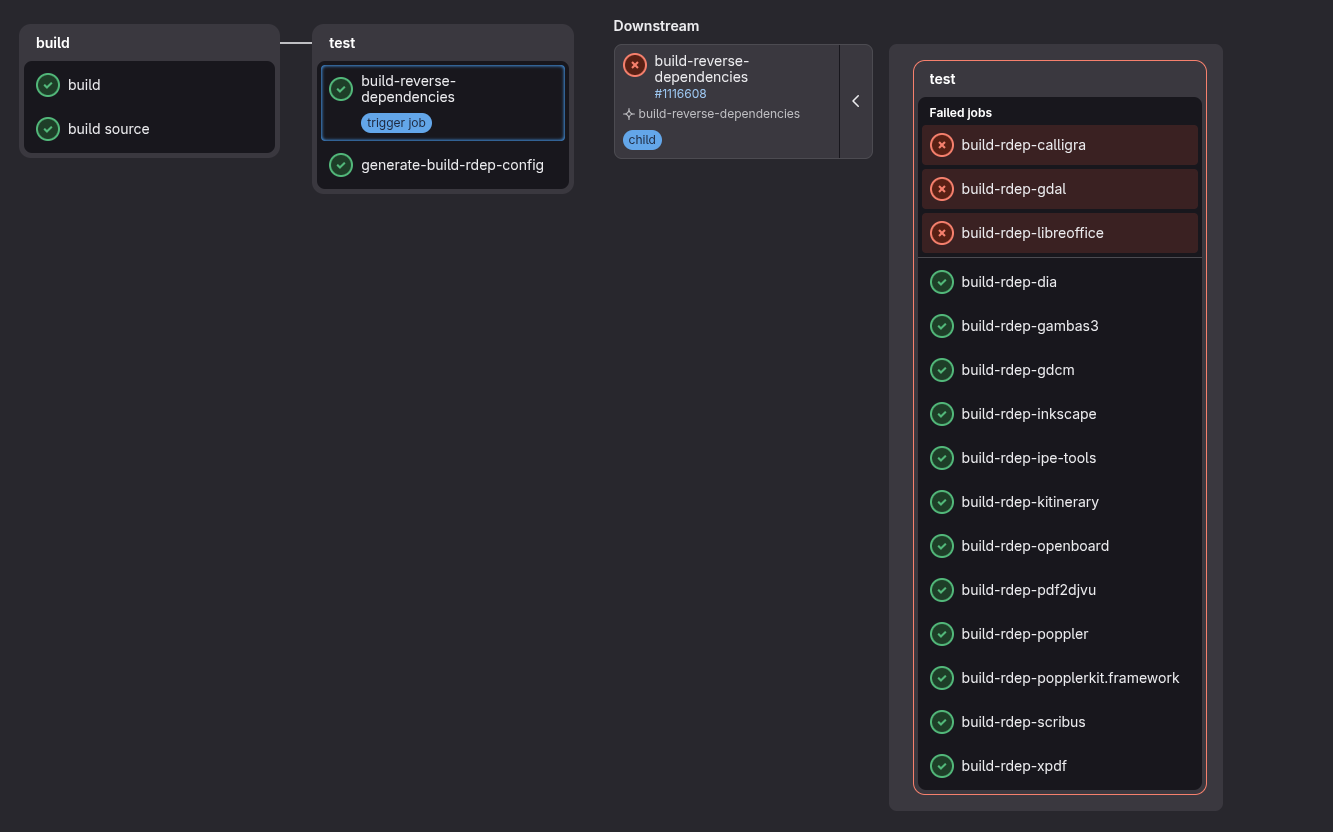 A Poppler test showing the selected rebuild jobs. Three jobs reached the CI timeout, they were not confirmed package regressions.










![[RSS 1.0 Feed]](common/rss10.png)
![[RSS 2.0 Feed]](common/rss20.png)
![[Atom Feed]](common/atom.png)
![[FOAF Subscriptions]](common/foaf.png)
![[OPML Subscriptions]](common/opml.png)
![[Hacker]](common/hacker.png)
![[Planet]](common/planet.png)